
- How do I edit sequences in Jalview?
- Can I install Jalview on a server?
- How do I get the consensus sequence for an alignment?
- How do I increase the memory available to Jalview?
- F2 key does not toggle Cursor mode on my Mac?
- Can I run Jalview from the command line?
- Something that normally works in Jalview has stopped working! What should I do?
- How do I report a bug in Jalview?old
- A Jalview file I created in an earlier version of Jalview no longer loads.
- My application doesn't like the "/start-end" sequence suffix in files saved by Jalview
- Jalview has encountered an error during launchold
- Jalview's Menus and Fonts are too small on my Linux machineold
- Jalview doesn't install/always crashes on startup in Windows when I have non-ASCII characters in my username.
- How do I set web proxy settings for Jalview's auto-updater and web services?old
- Jalview failed to launch, displaying an error saying it was "unable to download the necessary files"
- Is there a quick reference for Jalview?old
-
How do I edit sequences in Jalview?
Use the Mouse

Use the cursor keys

Edit Selected Region Only

Press F2 to enter Keyboard Mode

-
Can I install Jalview on a server?
Yes! Just remember to include the
--headlessflag on the command line (this is the default if your command is going to output a sequence or image file).For example:
jalview --headless --open ...The latest version of Jalview should run fine on a server without a graphics environment, but some operations may fail. If you encounter problems, submit a bug report.
-
How do I get the consensus sequence for an alignment?
Right-click on the ‘Consensus’ label for the consensus annotation track, and select “Copy consensus sequence”.
-
How do I increase the memory available to Jalview?
Full instructions for different operating systems and installations are here. If yours isn’t listed, drop us a line at the help address.
-
F2 key does not toggle Cursor mode on my Mac?
You may be using a keyboard which has visual / audio settings mapped onto the Function keys. You must press the “Fn” key, together with F2 key to toggle Cursor Mode.
-
Can I run Jalview from the command line?
Yes. The Jalview Desktop has a number of command line options, and recent versions of the Jalview Desktop application come with a command line tool ‘jalview’ that allows you to call it from the command line.
Open a command prompt or terminal and try:
jalview --helpThis should list the current set of arguments Jalview supports. The online documentation also includes a list of jalview command line parameters
Note: This FAQ has been updated - we no longer recommend the -Djava.ext.dirs=lib argument since it prevents Jalview from accessing some web services, and will be disabled in future versions of Java.
-
Something that normally works in Jalview has stopped working! What should I do?
One of the commonest causes of ‘strange behaviour’ that our users have reported seems to be Jalview running out of memory. Memory errors can cause some operations to fail silently - with no warning, annotations may disappear from the alignment window, and web service calculations (apparently) never finish.
You should be able to see something in the error log - see the instructions for bug reporting on how to view this. If you do see ‘Out of memory’ or ‘Cannot allocate stack’ or ‘HeapAllocationError’ type messages, then you might be able to fix it by increasing the memory available to jalview.
-
How do I report a bug in Jalview?
This FAQ answer refers to older versions of Jalview. The problem might not occur in the latest version, or the solution might be slightly different than described here.
Firstly, see if you can reproduce the bug. Check Jalview’s memory settings (Desktop->Tools->Show Memory usage) to make sure you have at least 50% memory free when testing this. If not, the problem might be because you ran out of memory when using Jalview.
Then, follow the instructions below to gather essential information regarding the bug:
- The Jalview desktop includes a Java Console - this is disabled by default, but if you enable it from the Desktop->Tools->Show Java Console menu item, a window will open that will contain the version of jalview and information about your operating system.
- The jalview java console can slow down some operations. If it takes too long to reproduce your bug with the console open, then close it and try another way below:
- If you installed Jalview using Java Webstart, locate and start the program “javaws” or “javaws.exe” on your system. Then click the “Edit” menu, select “Preferences” then click the “Advanced” tab. Make sure you check the “Java Console” option to “Show Console”, then click “OK” and restart Jalview. A Java console will be shown when Jalview starts up, and information about any problems should be output to the console window.
- If you installed Jalview with InstallAnywhere, you will find a text file in the directory in which you installed Jalview called “output.txt” Include this file with any bug report you have.
Prepare the input data and a description of how the bug is reproduced
Prepare a copy of the alignment file you are using when you find the bug, and try to describe as fully as possible the steps you took before the bug occurred. If you can reproduce the bug with a simpler data set, then send us that instead!
Make a bug report !
If you are familiar with bug tracking systems, then you can register and submit a bug report directly to the Jalview Bug Tracker, otherwise, post a message on the Jalview Discussion Forum describing the problem, and someone will take it from there.
- The Jalview desktop includes a Java Console - this is disabled by default, but if you enable it from the Desktop->Tools->Show Java Console menu item, a window will open that will contain the version of jalview and information about your operating system.
-
A Jalview file I created in an earlier version of Jalview no longer loads.
We have tried to ensure that all files created in earlier versions of Jalview can be read in by later versions. If you have a Jalview format file which no longer loads, please let us know by emailing the file to us. It is possible other people are having the same problem!
-
My application doesn't like the "/start-end" sequence suffix in files saved by Jalview
In the application, open the preferences dialog window (Tools -> Preferences) Open the tab labelled “Output” and then select which file formats to which you do not wish to append “/start-end”
-
Jalview has encountered an error during launch
This FAQ answer refers to older versions of Jalview. The problem might not occur in the latest version, or the solution might be slightly different than described here.
If you’ve been redirected to this FAQ then it probably means that the Jalview Native application has encountered an error whilst trying to start. Here are some tips for various problems:
Problems on Windows:
If your installation of Jalview goes fine, but double clicking on the Jalview icon does not produce any error message, window or any other activity (other than the spinning blue circle) this might be caused by a space character in Jalview’s installation folder. To fix this:
- Uninstall the non-working Jalview by either: * Open the Control Panel and go to Programs→Programs and Features→Uninstall a program. Select Jalview 2.11.1.0 from the program list and then click on the Uninstall/Change button above the list. This will launch Jalview’s uninstall wizard, follow the instructions. * Open a File Explorer and go to location %APPDATA%\Local\Jalview\uninstall.exe or %LOCALAPPDATA%\Local\Jalview\uninstall.exe if the first one isn’t found. This should launch Jalview’s uninstall wizard, follow the instructions.
- Install Jalview again using the same installer as before, but this time on the second screen (Select Destination Directory) ensure the path has no spaces (e.g. type in C:\Jalview)
Problems on linux:
- If you have used the Jalview-X_unix_installer_x_x_x-j8.sh installer, or the similar *-j8.tar.gz distribution, in some cicumstances you might get an error when launching Jalview that includes the message “Failed to rename ./jre.tgz_new to ./jre.tgz”:

This (slightly misleading) error message is caused by the launcher not being able to find the right version of the Java runtime environment (JRE).
For Jalview 2.11.1.0 or later we distribute an installer for linux with 64bit intel processors that bundles a JRE, we recommend using this installer to upgrade. For other linux platforms please read below.
In the case of Jalview 2.11.0 this should be Java 1.8. You can fix this by installing the right version of Java either with your distribution’s package manager. e.g.
On Ubuntu 18.04:
sudo apt install openjdk-8-jreOn CentOS 8 or Fedora 31:
sudo yum install java-1.8.0-openjdkor you can install a local version of the Java runtime environment – we recommend the installers from AdoptOpenJDK.
If after installing a Java 1.8 runtime environment you are experiencing the same problem, you may need to tell the Jalview launcher where to find the JRE 1.8 with the environment variable INSTALL4J_JAVA_HOME_OVERRIDE. You can achieve this on the command line with, e.g. (assuming you installed Jalview in the default location ~/opt/Jalview)
On Ubuntu 18.04,
INSTALL4J_JAVA_HOME_OVERRIDE=/usr/lib/jvm/java-8-openjdk-amd64 ~/opt/Jalview/JalviewOn CentOS 8 or Fedora 31
INSTALL4J_JAVA_HOME_OVERRIDE=/usr/lib/jvm/jre-1.8.0 ~/opt/Jalview/JalviewAlternatively you could add an “export INSTALL4J_JAVA_HOME_OVERRIDE=…” in your ~/.bashrc file but this could affect other applications installed using install4j.
Jalview will use a Java 11 runtime environment in version 2.12.
- If you have the openjdk-8-jre-headless package installed but NOT the openjdk-8-jre package (for example this might be default on an Ubuntu Server distribution) then you might find Jalview silently fails to launch and the ~/opt/Jalview/launcher.log file contains:
Exception in thread "Getdown" java.awt.AWTError: Assistive Technology not found: org.GNOME.Accessibility.AtkWrapperTo fix this you can either install openjdk-8-java with
sudo apt install openjdk-8-javaor comment out the following line “assistive_technologies=org.GNOME.Accessibility.AtkWrapper” in the file /etc/java-8-openjdk/accessibility.properties. You can do this with
sudo sed -i -E 's/^(assistive_technologies=org\.GNOME\.Accessibility\.AtkWrapper)/#\1/' /etc/java-8-openjdk/accessibility.propertiesOther problems:
Depending on your platform you will need to take a look at the launcher.log file within the Jalview installation directory:
- On Windows the Jalview installation directory defaults to %APPDATA%\Local\Jalview,
- On Linux/Unix the Jalview installation directory defaults to ~/opt/Jalview,
- On macOS the launcher.log file can be found in /Applications/Jalview.app/Contents/Resources/app. To get here in Finder right click on the Jalview icon in Applications and select “Show Package Contents”. You can then click through to Contents → Resources→ app . Warning! Editing or deleting files in the Jalview.app package might result in your Jalview installation breaking!
-
Jalview doesn't install/always crashes on startup in Windows when I have non-ASCII characters in my username.
There is a long-running bug in Java, mainly affecting Windows, that fails to read command line arguments with non-ASCII characters correctly.
For Jalview versions < 2.11.5.0 you will have to install Jalview in a location that doesn’t include your username, such as
C:\Program Files\Jalview. This unfortunately requires Administrator privileges and will need all automatic updates to be turned off (only available in 2.11.4.0). For earlier versions you could install Jalview inC:\Temp\Jalviewalthough this folder often gets emptied, so you may need to reinstall.From Jalview 2.11.5.0 you (or your Administrator) will still need to install Jalview in a non-user location such as
C:\Program Files\Jalview. During the installation wizard, under Advanced options, select Customise the user-space path and include a%U(per-cent, Upper-case U) in the path, e.g.C:\Temp\Jalview-Desktop\%U.Users should now be able to launch Jalview and will get automatic updates downloaded to that folder.
From Jalview 2.12 these problems will have been resolved.
-
How do I set web proxy settings for Jalview's auto-updater and web services?
This FAQ answer refers to older versions of Jalview. The problem might not occur in the latest version, or the solution might be slightly different than described here.
Jalview uses a launcher (called getdown, see https://github.com/threerings/getdown) that runs an auto-updater for Jalview and verifies Jalview files by checking the Jalview web site. Whilst the launcher checks for existing system proxy settings, sometimes it does not find those settings. In this case it may pop up a window asking for proxy settings. If this does not happen, and proxy settings are required, you can create a file called
proxy.txtthat should contain your proxy host and port like this:
host=your.proxyhost.com
port=3128
You should put the file in the same folder as the file getdown.txt:
- In Windows this is the folder you installed Jalview into (by default this is %APPDATA%\Local\Jalview)
- In macOS this is buried in the Jalview application bundle as Contents/Resources/app (by default /Applications/Jalview.app/Contents/Resources/app/)
- In Linux this is also the folder you installed Jalview into (by default this is ~/opt/jalview/).
The current release (2.11.1.0) does not pass settings from this file on to the Jalview application. This will be fixed in a future release. In the meantime you can configure the proxy for Jalview in Jalview’s own Preferences (see Tools->Preferences->Connections).
-
Jalview failed to launch, displaying an error saying it was "unable to download the necessary files"
If you have a problem launching Jalview that results in an error message on the splash screen reading:
“We were unable to download the necessary files after five attempts. You can try running the application again, but if it fails you may need to uninstall and reinstall.”
Like this screenshot:
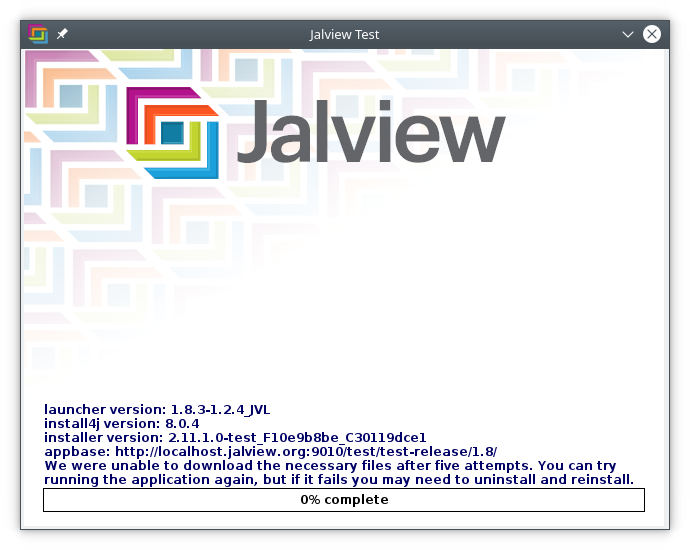
Then you should close the splash screen window and try and launch the Jalview application again.
If this does not work, you should install the latest Jalview release (found at https://www.jalview.org/getdown/release/). The latest installer can be installed on top of the old version.
-
Is there a quick reference for Jalview?
This FAQ answer refers to older versions of Jalview. The problem might not occur in the latest version, or the solution might be slightly different than described here.
Yes, a quick reference PDF for an early release of Jalview 2 is here, but we haven’t updated it for a while.